Sometimes you need to prove that you sent a Monero payment — for example, to show a merchant or exchange that your transaction really reached their address. Because Monero is private, a payment can't be checked from the blockchain alone, but Monero gives you a way to prove a specific payment to a specific recipient.
Cake Wallet shows you everything you need, and Cake's own Monero block explorer can verify it.
Find the details in Cake Wallet
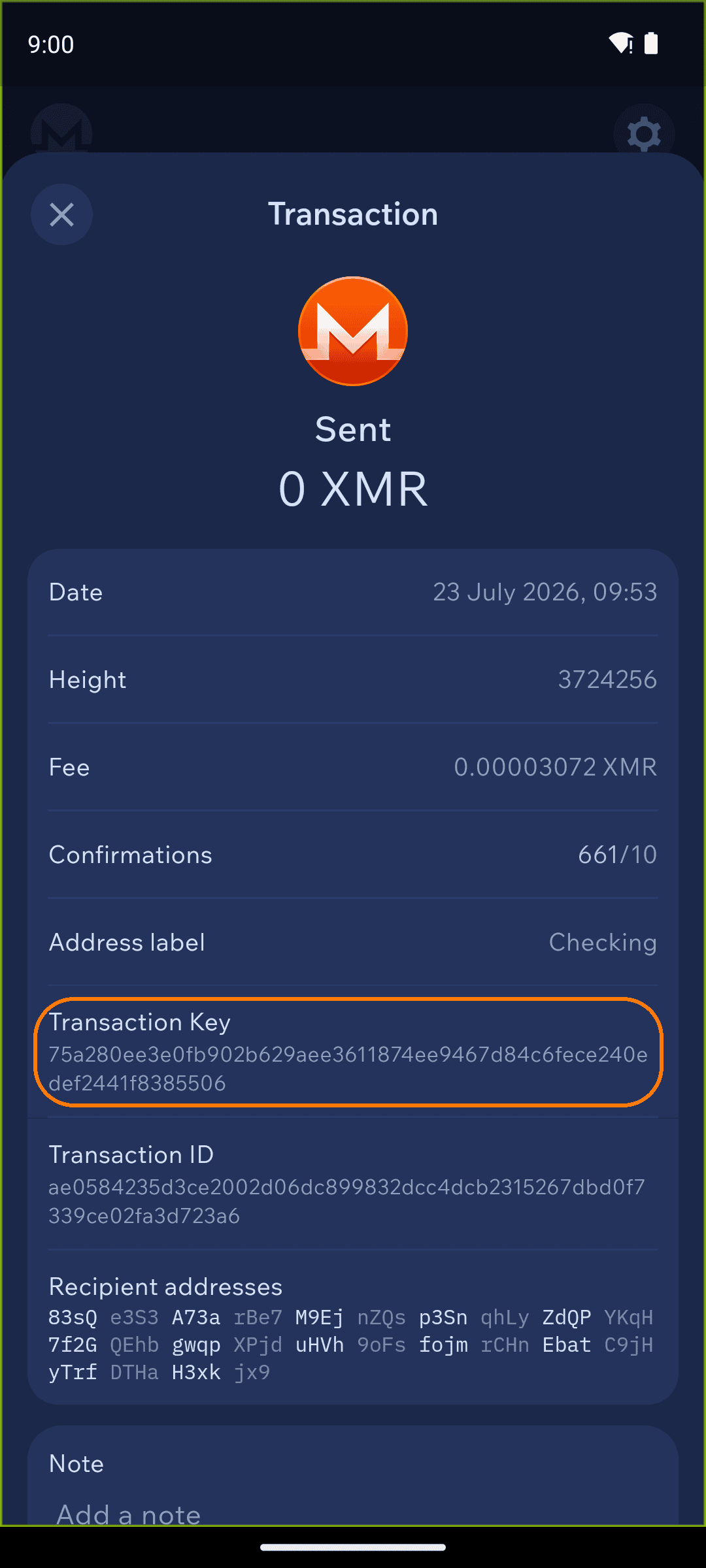
Open your Monero wallet and tap the sent transaction in your history to open its details. You'll need three values from this screen:
Transaction ID
Recipient address (under "Recipient addresses")
Transaction Key
Tap any value to copy it.
Monero transaction details showing the Transaction ID, Recipient addresses, and Transaction Key
Verify on the Monero explorer
Go to explorer.monero.com and choose "I sent Monero." On the Get a transaction receipt page, fill in:
Transaction ID
Recipient address
Secret transaction key — this is the Transaction Key from Cake Wallet
Then tap Get receipt. The explorer confirms the amount that was sent to that address in that transaction — a receipt you can share as proof of payment.
The explorer also has an "I received Monero" option for proving a payment you received — choose it instead and follow the on-screen prompts.